freshrss 可用镜像介绍
freshrss镜像有两个来源一个是freshrss官方构建的,一个是linuxserver构建的,它们的可用性都不错
freshrs官方:
它的镜像大致分为两类一个是基于debian一个是基于alpine,无论哪个都是采用的Apache加php架构
~ # docker run -it --rm --net host freshrss/freshrss:alpine
[Tue Sep 23 03:00:49.032400 2025] [mpm_prefork:notice] [pid 1:tid 1] AH00163: Apache/2.4.65 (Unix) PHP/8.4.11 configured -- resuming normal operations
[Tue Sep 23 03:00:49.032444 2025] [core:notice] [pid 1:tid 1] AH00094: Command line: 'httpd -D FOREGROUND'
[Tue Sep 23 03:02:44.485129 2025] [mpm_prefork:notice] [pid 1:tid 1] AH00170: caught SIGWINCH, shutting down gracefully
~ # docker run -it --rm --net host freshrss/freshrss
[Tue Sep 23 03:02:50.335003 2025] [mpm_prefork:notice] [pid 1:tid 1] AH00163: Apache/2.4.62 (Debian) configured -- resuming normal operations
[Tue Sep 23 03:02:50.335052 2025] [core:notice] [pid 1:tid 1] AH00094: Command line: 'apache2 -D FOREGROUND'
^C[Tue Sep 23 03:03:46.843017 2025] [mpm_prefork:notice] [pid 1:tid 1] AH00169: caught SIGTERM, shutting down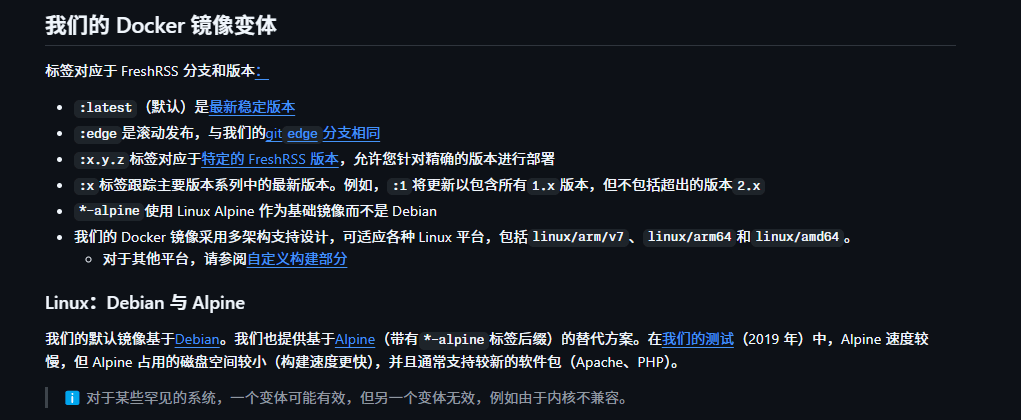


可以看到无论哪种其实它们的进程信息都比较的简单
linuxserver:
它的镜像全部采用alpine的基础镜像,配置php-fpm和nginx
它采用的是自己的s6-supervise服务,拉起了php和nginx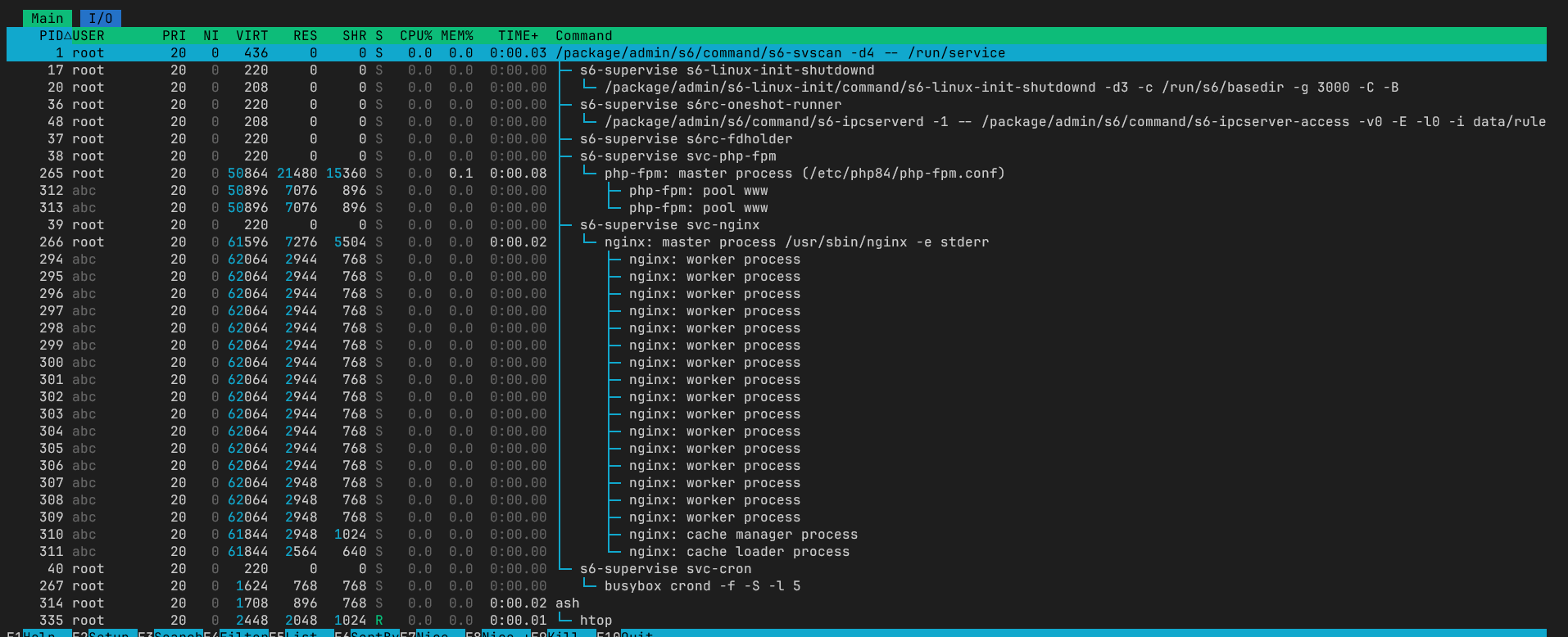
对比
镜像大小
linuxserver/freshrss latest  3c48add07f0b   38 hours ago   149MB
freshrss/freshrss    latest  2b53d2708fc7   5 weeks ago    338MB
freshrss/freshrss    alpine  c07723ca53ea   5 weeks ago    107MB
内存占用
~ # docker stats --no-stream
CONTAINER ID   NAME          CPU %     MEM USAGE / LIMIT    MEM %     NET I/O         BLOCK I/O         PIDS
a1bf0e8afb54   debian        0.00%     42.91MiB / 14.1GiB   0.30%     380kB / 241kB   11.2MB / 2.78MB   13
a59d61e32447   alpine        0.01%     32.14MiB / 14.1GiB   0.22%     380kB / 244kB   4.1kB / 2.7MB     13
02c708934ac2   linuxserver   0.03%     41.86MiB / 14.1GiB   0.29%     353kB / 318kB   9.45MB / 16.7MB   32
目录
freshrss官方镜像的网站目录为/var/www/FreshRSS
提供的compose文件推荐映射的数据目录是
    volumes:
      - data:/var/www/FreshRSS/data
- extensions:/var/www/FreshRSS/extensionslinuxserver镜像的网站目录为/app/www/
提供的compose文件推荐映射的数据目录是
    volumes:
      - /path/to/freshrss/config:/config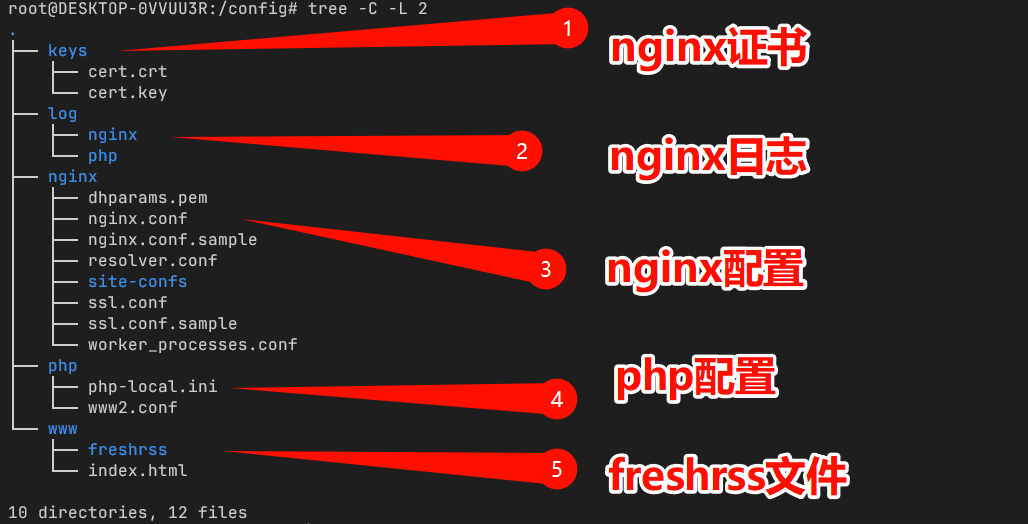
其实不难看出,freshrss官方镜像的数据目录在linuxserver中依旧存在,它采用的是软链接的方式
root@02c708934ac2:/config# ls --color -tl /app/www/
lrwxrwxrwx  1 root root     31 Sep 23 03:28 extensions -> /config/www/freshrss/extensions
lrwxrwxrwx  1 root root     25 Sep 23 03:28 data -> /config/www/freshrss/data
所以如果使用Linuxserver镜像但是不需要修改其他的配置的话,可以只要映射这两个目录的
    volumes:
      - data:/config/www/freshrss/data
      - extensions:/config/www/freshrss/extensions
其他的配置其实是用来配合nginx实现https效果的
版权声明:本文为原创文章,版权归 随笔 所有,转载请联系博主获得授权。
本文地址:https://han.kozow.com/archives/39/
如果对本文有什么问题或疑问都可以在评论区留言,我看到后会尽量解答。
暂无标签